Exploring the 3D Chrome Arrows Pack: A Modern Design Essential
The 3D Chrome Arrows Pack is more than just a collection of digital graphics—it's a versatile toolkit for designers, creators, and professionals looking to enhance their visual projects with a sleek, futuristic aesthetic. Whether you're crafting a presentation, designing a website, or developing motion graphics, this pack offers a range of high-quality chrome arrows that bring a polished, professional look to your work.
What Is the 3D Chrome Arrows Pack?
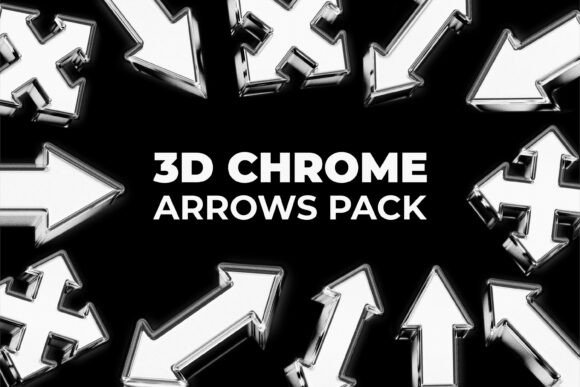
The 3D Chrome Arrows Pack consists of multiple high-resolution 3D arrow elements designed with a modern, metallic chrome finish. These arrows are created to stand out with their glossy reflections and clean edges, making them ideal for a variety of design applications. Each arrow is isolated on a black background, ensuring easy integration into different projects without the need for extensive editing.
- File Format: PNG
- Resolution: High resolution (6000 × 3000 px)
- Style: 3D chrome metallic
- Background: Black, isolated objects
- Quality: Sharp details, realistic reflections, clean edges
Why Use the 3D Chrome Arrows Pack?
Visual clarity and aesthetic appeal are crucial in modern design. The 3D Chrome Arrows Pack helps designers achieve both by providing ready-to-use elements that add depth and sophistication to any project. Here are some key reasons why this pack is a valuable asset:
- Directional Guidance: Arrows are universally recognized as directional symbols. Whether you're guiding a user through a website or indicating a process in a presentation, these arrows offer clear visual cues.
- Modern Aesthetic: The chrome finish gives these arrows a sleek, high-tech appearance that aligns well with contemporary design trends.
- Versatility: With various arrow directions and shapes included, the pack is suitable for a wide range of design contexts, from UI elements to digital illustrations.
- High-Quality Output: The high-resolution PNG format ensures that images remain crisp and detailed, even when scaled up for large-format printing or high-definition screens.
Applications Across Industries
The 3D Chrome Arrows Pack is not limited to a single use case. Its adaptability makes it a go-to resource for professionals across multiple fields:
- UI/UX Design: Enhance website navigation, buttons, and interactive elements with visually striking arrows that draw attention without overwhelming the design.
- Presentation Design: Use chrome arrows to highlight key points, indicate transitions, or guide the audience's focus during slideshows.
- Motion Graphics: Incorporate these arrows into animated sequences for a dynamic, high-impact visual effect.
- Poster and Print Design: Add a modern touch to promotional materials, infographics, or directional signage.
- Digital Interfaces: Ideal for app design, dashboards, and interactive kiosks where intuitive navigation is essential.
Understanding the Design Elements
Each arrow in the 3D Chrome Arrows Pack is crafted with precision, combining realism and style to deliver a visually compelling element. Here's a breakdown of the key design features:
- 3D Modeling: The arrows are rendered in three dimensions, giving them depth and realism that flat icons can't match.
- Chrome Material: The metallic chrome surface reflects light realistically, adding a sense of luxury and modernity.
- Glossy Reflections: High-quality lighting effects simulate real-world reflections, making the arrows appear lifelike.
- Clean Edges: Every arrow is carefully rendered to ensure sharp outlines and smooth surfaces, essential for professional-grade design work.
How to Incorporate These Arrows Into Your Projects
Using the 3D Chrome Arrows Pack effectively requires some understanding of design principles and the tools you're working with. Here are a few tips to get the most out of these assets:
- Layer Smartly: Since the arrows are isolated on black backgrounds, they can be easily placed over other images or color schemes. Consider adjusting blending modes or adding shadows for a more integrated look.
- Match the Theme: Chrome arrows work best in designs with a modern or tech-inspired theme. Pair them with dark backgrounds, geometric shapes, or minimalist layouts for a cohesive aesthetic.
- Use for Emphasis: These arrows are excellent for drawing attention to specific areas of a design. For example, use them to point to a call-to-action button or highlight a key feature in an infographic.
- Scale with Care: Thanks to their high resolution, these arrows can be resized without losing quality. However, avoid stretching them too far beyond their original proportions to maintain visual integrity.
Common Misconceptions About Chrome Arrows
While chrome arrows are visually appealing, there are some common misconceptions about their use:
- Misconception 1: "Chrome arrows are too flashy for serious design." Reality: When used appropriately, chrome arrows can enhance a design without overpowering it. Their reflective surface adds dimension, not distraction.
- Misconception 2: "These arrows are only for futuristic or sci-fi themes." Reality: While chrome arrows do fit well in tech-themed designs, they can also complement minimalist, luxury, or industrial-style visuals.
- Misconception 3: "All chrome arrows look the same." Reality: This pack includes a variety of directions and shapes, allowing for creative flexibility. From curved arrows to multi-point indicators, each element serves a unique purpose.
The Role of 3D Elements in Modern Design
As digital design continues to evolve, 3D elements like the Chrome Arrows Pack are becoming increasingly important. Unlike flat icons or 2D illustrations, 3D graphics offer a more immersive and dynamic visual experience. They can be used to simulate real-world objects, create depth in digital interfaces, or simply add a touch of realism to a design.
In the context of user experience (UX) design, 3D elements can improve navigation and interaction by providing visual cues that feel more intuitive. For example, a chrome arrow indicating a scroll direction can be more engaging than a simple line arrow.
Looking Ahead: The Future of Design Assets
As technology advances, the demand for high-quality, realistic design assets will continue to grow. Tools like augmented reality (AR), virtual reality (VR), and advanced UI/UX frameworks are pushing the boundaries of what's possible in digital design. In this landscape, assets like the 3D Chrome Arrows Pack will remain relevant for their ability to blend realism with functionality.
Designers who embrace these tools will find themselves better equipped to meet the expectations of modern audiences who crave visual richness and interactivity. Whether you're a seasoned professional or just starting out, having access to high-quality 3D assets can elevate your work and set you apart from the competition.
Conclusion
The 3D Chrome Arrows Pack is more than just a design resource—it's a powerful tool that bridges the gap between aesthetics and functionality. With its high-resolution PNG files, realistic chrome textures, and diverse range of arrow styles, this pack offers something for every designer, regardless of their field or experience level.
By understanding how to use these elements effectively, you can enhance your projects with a touch of modernity and professionalism. Whether you're building a sleek website, crafting a compelling presentation, or designing a user interface, the 3D Chrome Arrows Pack is a valuable addition to your creative toolkit.