Gothic Botanical Mushroom PSP Masks: Create Moody Magic in Your Digital Art
Bring Dark Woodland Charm to Your Creative Projects
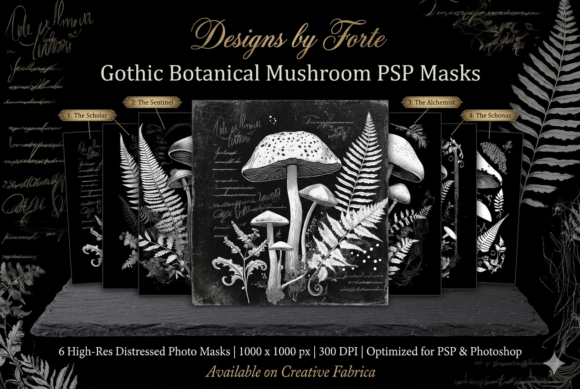
If you're a digital artist, scrapbooker, or graphic designer looking to add depth, texture, and a touch of the mystical to your work, the Gothic Botanical Mushroom PSP Masks could be exactly what you need. This set of six high-contrast, black-and-white masks is designed for PaintShop Pro and Photoshop users who want to blend photos, textures, and digital papers with ease. Each mask features vintage mushrooms, delicate ferns, and botanical elements paired with faux-calligraphy script—perfect for crafting that moody, witchy, or whimsigoth vibe.
What You Get and Why It Works
Each Gothic Botanical Mushroom PSP Mask comes in a clean 1000 x 1000 pixel format at 300 DPI, making them ideal for both print and digital use. These aren't just decorative overlays—they're functional tools that help you blend layers with precision. Whether you're working on a digital scrapbook layout or designing a dark fantasy book cover, these masks give your projects an instant atmospheric lift.
Because they're high-contrast and distressed, they work especially well with textured backgrounds and vintage-style compositions. You can layer them over photos to create a haunting forest feel or use them as framing elements in alternative branding layouts.
Real-World Uses for Gothic Botanical Mushroom PSP Masks
Let’s look at how different users apply these masks in their daily creative workflows:
- Digital scrapbookers use them to frame journal entries or photo collages with a gothic botanical edge.
- Junk journal creators blend them with scanned paper textures and ink splatters to build eerie, layered backgrounds.
- Self-published authors incorporate them into book covers for dark fantasy, horror, or mystery genres.
- Alternative lifestyle brands utilize them in social media graphics or packaging design to evoke a moody, nature-inspired aesthetic.
- Photographers overlay them on fine-art portraits to add a surreal, forest-inspired texture.
Whether you're creating for personal expression or professional output, these masks help you achieve a layered, handcrafted look without the need for complex editing techniques.
How to Use Gothic Botanical Mushroom PSP Masks in PaintShop Pro
Using these masks is straightforward, even if you're new to PaintShop Pro. Simply open your background image, load the mask from the file menu, and adjust the layer blending modes to achieve the effect you want. Because they’re high-contrast black-and-white files, they work seamlessly with layer masks and clipping masks—giving you full control over how they blend with your base image.
For example, if you're designing a Halloween-themed poster, you could place a mushroom mask over a foggy forest photo and adjust the opacity to create a ghostly overlay. Or if you're making a dark academia-inspired social media post, layer a fern mask over a vintage paper texture to add depth and visual interest.
Who Benefits Most from These Gothic Botanical Masks?
These masks appeal to a wide range of creators:
- Freelance designers who need to deliver unique, atmospheric visuals for clients in the alternative lifestyle or fantasy niches.
- Bloggers and content creators who want to stand out with a consistent, moody aesthetic across their digital platforms.
- Small business owners selling handmade or gothic-inspired products and looking for a professional edge in branding and packaging.
- Hobbyists and educators who enjoy digital art as a creative outlet or use it for teaching digital design techniques.
Whether you're a beginner or a seasoned pro, these masks can help you achieve professional-level results with minimal effort.
Things to Consider Before Buying or Using Gothic Botanical Mushroom PSP Masks
Before diving in, here are a few practical points to keep in mind:
- Make sure you're using a compatible version of PaintShop Pro or Photoshop. These masks are optimized for layer masking workflows.
- Check the file size and resolution to ensure they'll work for your intended output—especially if you're printing.
- Think about how the style fits your project. These masks lean heavily into dark botanical themes, so they may not be the best fit for bright, minimalist designs.
- Consider how you'll license and use them. Always check the terms of use, especially if you're incorporating them into commercial products.
Taking a moment to evaluate your needs and tools can help you avoid frustration and get the most out of your purchase.
Getting Real Results: Examples from Actual Users
Many users have found creative ways to integrate these masks into their work. One scrapbook artist used a mushroom mask to frame a photo of a foggy forest hike, blending it with a vintage paper background for a haunted journal page. Another designer layered a fern mask over a black-and-white portrait to create a surreal, ethereal look for a personal art portfolio.
One small business owner selling handmade candles used the faux-calligraphy script mask in their Instagram posts to give a mystical, artisanal feel to their brand. The key takeaway? These masks aren't just for one type of project—they're versatile enough to be reimagined in countless ways.
Final Thoughts: Gothic Botanical Mushroom PSP Masks Are More Than Just Pretty Layers
At their core, these masks are tools that help you express your creativity more effectively. Whether you're building a digital mood board, designing a book cover, or crafting a personal art piece, the Gothic Botanical Mushroom PSP Masks offer a unique blend of texture, contrast, and atmosphere that’s hard to replicate manually.
If you're drawn to dark botanical aesthetics and want to streamline your workflow while elevating your designs, this mask set is worth exploring. They’re not just about adding visual flair—they're about helping you create with more depth, intention, and ease.